WhatsApp QR marketing works when a scan starts a useful, expected conversation. This guide explains how to plan, design, test, publish, measure, and maintain the experience in flyers, storefronts, packaging, receipts, event booths, and sales materials.
Explore useful GetQRly tools: QR generator, WhatsApp QR, WiFi QR, Google review QR, business card QR, restaurant menu QR, and static vs dynamic QR codes.
Introduction
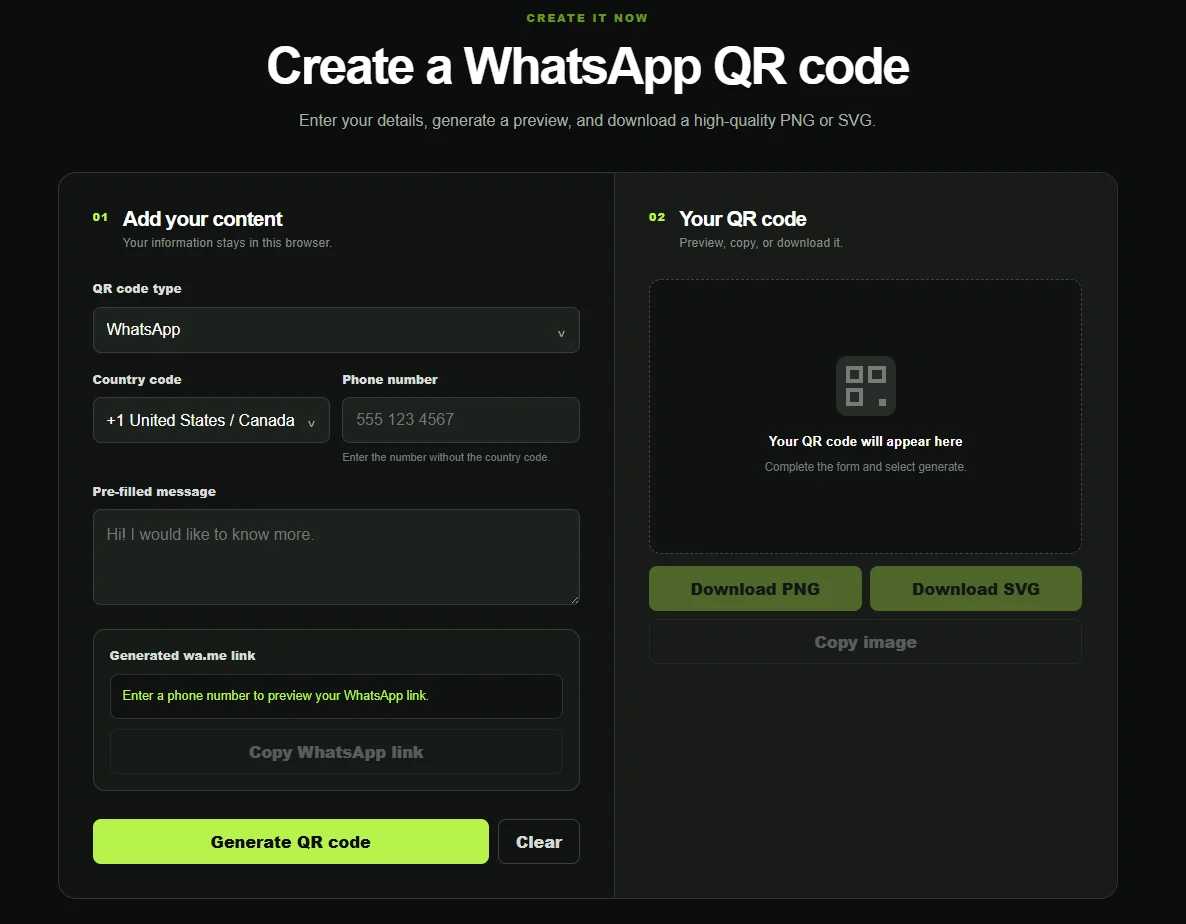
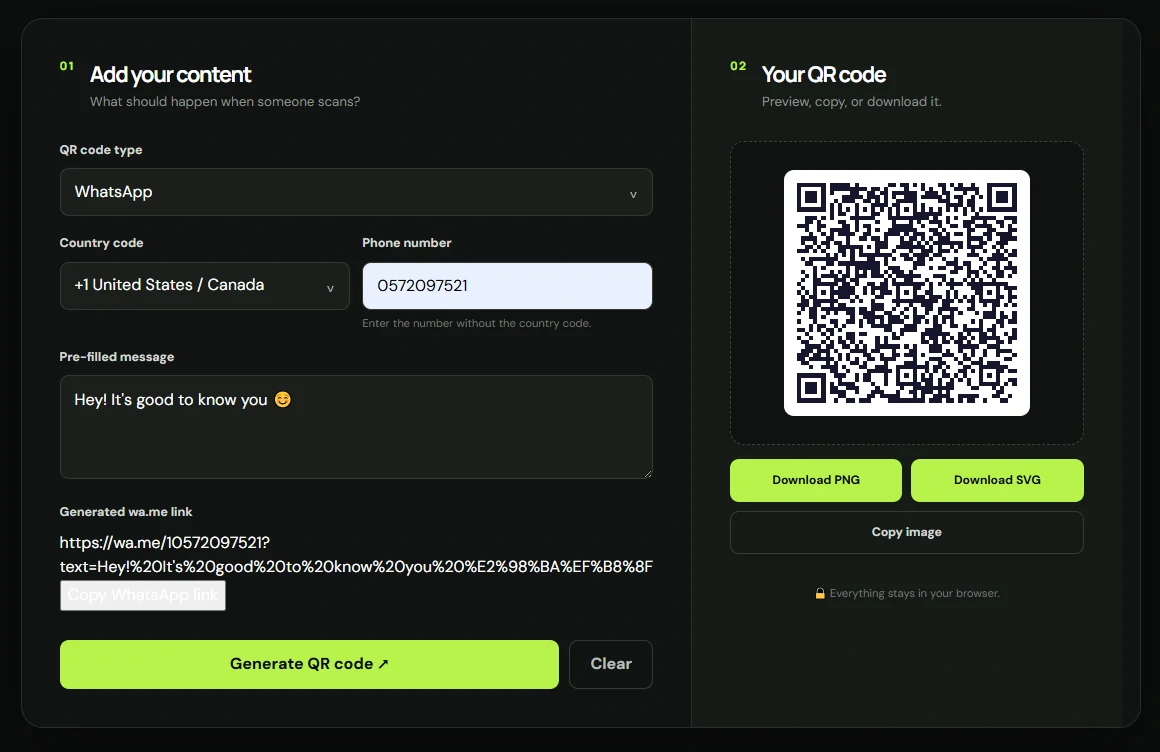
WhatsApp QR codes need more than a scannable image. The tool should create a correct wa.me click-to-chat link, handle country codes, encode pre-filled messages, and let teams copy the link as well as download the QR code.
This comparison is written for local businesses, service teams, restaurants, retailers, and marketers. It focuses on practical decision-making rather than hype: what the tool is best for, where it may be limited, whether it supports static and dynamic QR codes, and when a simpler GetQRly workflow may be enough.
Article plan
- Why this QR type matters
- Key features to look for
- Ranked platform list with strengths and limitations
- Quick comparison table
- How to create this QR code with GetQRly
- Best practices, common mistakes, and FAQ
Why this QR type matters
This QR type matters because WhatsApp is often the fastest path from offline interest to a real conversation. A good code can turn flyers, packaging, receipts, vehicles, and storefronts into sales, support, or booking channels.
The right generator should match the real-world environment where the code appears. A QR code on storefronts, product packaging, receipts, advertisements, event booths, and service vehicles must scan reliably, explain the next step clearly, and lead to a destination that works well on a phone. That matters more than a long feature list that never gets used.
Key features to look for
- Country-code handling and clean number formatting
- Pre-filled WhatsApp message support
- Visible wa.me link preview and copy link option
- PNG/SVG QR downloads
- Dynamic QR option for scan tracking and campaign changes
Also check export quality, account requirements, scan limits, whether codes expire, and whether analytics are useful without collecting more data than you need. For background on code types, read Static vs Dynamic QR Codes.
Selection notes for this comparison
WhatsApp comparison pages need a slightly different lens from general QR code reviews. A generic URL QR generator can point to WhatsApp, but a stronger WhatsApp-focused tool helps users build the link correctly before the QR code is created. Country codes, local number formatting, and encoded message text are where many mistakes happen. If the generator hides the final link, teams may print a code without realizing that the number includes an extra zero, the message is missing context, or the chat opens to the wrong account.
For businesses, the best WhatsApp QR code generator should support both online and offline use. The copied link may go into an Instagram bio, email signature, website button, or paid ad. The QR code may go on packaging, flyers, receipts, restaurant cards, appointment reminders, vehicles, or trade show materials. A useful tool lets the team test the same wa.me destination in both formats and choose whether a static code is enough or a dynamic QR code is safer for tracking and future edits.
The ranking below favors tools that make the customer journey understandable. A polished dashboard is helpful, but the basics still matter: the phone number should be easy to enter correctly, the pre-filled message should be visible before download, the QR should scan reliably, and the business should know what happens after the first message arrives. That is why a lightweight option can be better than a complex platform for some small businesses, while larger teams may prefer stronger analytics, permissions, and brand controls.
Another factor is how the organization will respond once messages arrive. A solo consultant may only need one code that opens a direct chat. A restaurant may need separate codes for reservations, catering, takeaway questions, and private events. A retailer may want one message for stock checks and another for delivery questions. Agencies and franchises may need naming conventions, location-specific numbers, reports, approval controls, and a plan for replacing codes when campaigns end. Choosing the best WhatsApp QR code generator is really choosing the tool that supports that response process without adding unnecessary steps for the customer.
Evaluate each platform against the placement, not just the dashboard. A QR code on a small product label needs a simple message, dependable scan quality, and a support number that will remain active. A code on a high-value print campaign may need dynamic redirects and analytics because reprinting is expensive. A code in a restaurant may need staff training more than advanced design controls. A code on a website may not need a QR image at all; the copied WhatsApp link may be the more important output. The best tool is the one that handles the real channel cleanly.
Before publishing, test both outputs: click the WhatsApp link from a desktop and mobile browser, then scan the QR code from the final artwork. Confirm that the right account opens, the message is readable, and nothing is sent automatically. This small test protects every later placement. It also helps staff understand the exact wording customers will see before the first conversation starts, including during busy hours, after-hours support periods, event rushes, seasonal campaign spikes, weekend promotions, and holiday offers too.
Ranked list of QR code generator platforms
GetQRly is a practical option when you want speed, clean exports, and focused QR workflows without a heavy enterprise setup. Fast static QR codes and simple dynamic QR management Free static tools available; check current pricing for future paid plan details. Uniqode is strong for teams that treat QR codes as ongoing marketing infrastructure. Business and enterprise QR campaigns Free/trial options may vary; check current pricing. QR TIGER fits teams that want a flexible feature set and many QR destinations. Marketers who need many QR types Free and paid options may vary; check current pricing. QRCodeChimp is useful when design, branded landing experiences, and contact-sharing features matter. Branded QR campaigns and digital cards Free and paid options may vary; check current pricing. Flowcode is a recognizable choice for teams building polished public-facing campaigns. Brand and media campaigns Free and paid options may vary; check current pricing. Bitly is useful when QR codes are part of a broader short-link and attribution workflow. Teams already using short links Free and paid options may vary; check current pricing. Canva is convenient when the QR code is only one part of a larger visual design. Designers already building layouts in Canva Free and paid Canva plans may vary; check current pricing. QRCode Monkey is a good fit for attractive static QR artwork when tracking is not required. Free static QR code design Free static option generally available; check current pricing or product changes.GetQRly
Uniqode
QR TIGER
QRCodeChimp
Flowcode
Bitly QR Codes
Canva
QRCode Monkey

Create your QR code with GetQRly
Generate static and dynamic QR codes, download PNG/SVG files, and track scans from one dashboard.
Quick comparison table
Use this table as a quick shortlist. Features and plan limits can change, so check current pricing and current plan details before committing an important campaign.
| Platform | Best For | Static QR | Dynamic QR | Analytics | Customization | Free Option |
|---|---|---|---|---|---|---|
| GetQRly | Fast static QR codes and simple dynamic QR management | Yes | Yes | Basic to full by plan | Clean exports | Yes |
| Uniqode | Business and enterprise QR campaigns | Yes | Yes | Yes | Strong | Yes |
| QR TIGER | Marketers who need many QR types | Yes | Yes | Yes | Strong | Yes |
| QRCodeChimp | Branded QR campaigns and digital cards | Yes | Yes | Yes | Strong | Yes |
| Flowcode | Brand and media campaigns | Yes | Yes | Yes | Strong | Yes |
| Bitly QR Codes | Teams already using short links | Yes | Yes | Yes | Moderate | Yes |
| Canva | Designers already building layouts in Canva | Yes | Limited | Limited | Design-first | Yes |
| QRCode Monkey | Free static QR code design | Yes | No | No | Strong | Yes |
How to create this QR code with GetQRly
Open the GetQRly WhatsApp Link & QR Code Generator, choose a country code, enter the phone number, write an optional message, copy the wa.me link if needed, then generate and download the QR code.
You can also start from the general QR code generator, share guest access with the WiFi QR code generator, create contact codes with the business card QR code generator, open chats with the WhatsApp QR code generator, publish menus with the restaurant menu QR code generator, and request feedback with the Google review QR code generator.
Best practices
Choose the QR tool after defining the user action. Write the call to action first, confirm the destination, generate the code, and test the final artwork on real phones. Keep the design high-contrast, preserve the quiet zone, and use SVG for professional print layouts.
For business materials, keep a simple inventory of where each code appears. That makes it easier to replace outdated codes, update dynamic destinations, and remove temporary campaign materials after they expire.
Common mistakes
- Choosing a platform only because it has the longest feature list.
- Printing before testing the final QR code at the final size.
- Using a static QR code when the destination is likely to change.
- Ignoring mobile page speed and sending scanners to a desktop-heavy page.
- Forgetting an accessible fallback such as a readable URL, staff help, or printed alternative.
The safest approach is boring in the best way: a clear promise, a readable code, a fast destination, and a maintenance plan. That combination usually beats a decorative QR code attached to a confusing workflow.
Conclusion
The best platform for best whatsapp qr code generators for businesses depends on the job. GetQRly is a good fit for lightweight creation, clean exports, and small-business dynamic QR basics. Larger platforms may be better when you need deep analytics, teams, integrations, or enterprise governance.
Before choosing, create one test code, print it at the intended size, scan it under realistic conditions, and confirm that the destination creates the action you actually want. A careful test tells you more than a feature grid alone.
Rate it after reading so we can keep improving GetQRly guides.